


Overview
DotNetAge event monitoring architecture prototype is from the Observer design pattern. It 's a application level event model. The event monitoring service also provides service location to support dependency injection. DotNetAge allows developers adding observers to extend the system behaviors.
Observer design pattern
The observer design pattern enables a subscriber to register with and receive notifications from a provider. It is suitable for any scenario that requires push-based notification. The pattern defines a provider (also known as a subject or an observable) and zero, one, or more observers. Observers register with the provider, and whenever a predefined condition, event, or state change occurs, the provider automatically notifies all observers by calling one of their methods. In this method call, the provider can also provide current state information to observers. In the .NET Framework, the observer design pattern is applied by implementing the generic System.IObservable
For more about Observer design pattern please refer to following list:
Scenarios
- Add more behaviors to existing services/modules.
- Set aside for services/modules extensions points.
Architecture
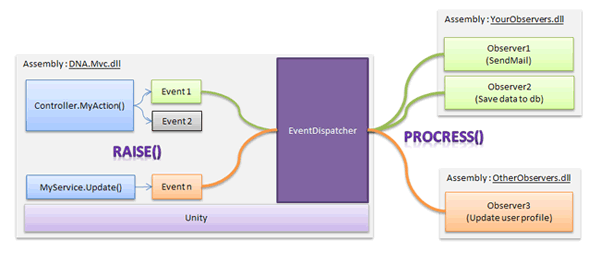
Event
An event is a message sent by an object to signal the occurrence of an action. Invoke event.Raise() method to notify the EventDispatcher to send the event object to observers. The events must be inherit from EventBase abstract class.
The following example shows how to raise a new order event in Action.
//Define a NewOrder event class
public class NewOrderEvent:EventBase
{
   public NewOrderEvent(Order order)
   {
       this.Order=order;
   }

   public Order Order{get;private set;}
}


public class OrderSampleController:Controller
{
   IOrderRepository _respository;
   public OrderSampleController(IOrderRepository respository;
   {
      _respository=respository;
   }

   [HttpPost]
   public ActionResult Purchase(Order order)
   {
        //Save new order
         respository.Create(order);
         respository.Submit();

         //Raise event
        new NewOrderEvent(order).Raise(HttpContext);

        return View();
   }
}
Raise() method notify EventDispatcher to find which observers should handling the NewOrderEvent and execute them.
Observer
Observer is handling the event.EventObserver is the base class implement the System.IObsever
The following example is how to create an observer to handle the NewOrderEvent
Step1:Create an observer
public class NewOrderObserver : EventTypebaseObserver
{
   public void Process(NewOrderEvent e)
   {
        //Event handling: Set the order stat
        e.Order.State=New;
        ...
   }
}
Step2:Register the observer and add to DotNetAge
unity.config
<unity xmlns="http://schemas.microsoft.com/practices/2010/unity">
  <alias alias="NewOrderObserver" type="Example.NewOrderObserver,Example" />
  <register type="EventObserver" mapTo="NewOrderObserver" name="newOrderObserver" />
unity>
DotNetAge events
The following table list available events for the DotNetAge
| Event | Description |
|---|---|
| DNA.Mvc.PasswordChangedEvent | Raised when user password is changed |
| DNA.Mvc.ReceivePasswordEvent | Raised when format password token is send. |
| DNA.Mvc.UserRegistedEvent | Raised when user register successful. |
| DNA.Mvc.Community.Events.DeletePostEvent | Raised when a thread or a post was deleted. |
| DNA.Mvc.Community.Events.NewPostEvent | Raised when a thread or post was added. |
| DNA.Mvc.Publishing.ArticleUpdateEvent | Raised when a new article was updated. |
| DNA.Mvc.Publishing.NewCommentEvent | Raised when a new comment was added. |
-
Average:
-
Читает(990)
-
Trackback(0)
-
Постоянная ссылка
Комментарии (0)